by WebKeyDesign | Jun 19, 2007 | Microsoft
Over the last month, I have had to do a lot of software testing and I have had to install Linux, Windows XP, and even Windows98, a few times on Virtual PC 2007. Undeniably I have come to some conclusions on operating system installs and Virtual PC as a testing tool. Without a doubt Virtual PC has too many flaws to be the testing tool I wanted it to be. Microsoft has taken Connectix’s Macintosh product and made it into a virtualization tool for Windows users who want to install all different flavors of Windows on their PC, but in doing so they have not improved on the product as one would imagine they would.
- 16-bit color is still really the optimal choice for most virtual machines. This is something that you run into right away when you try installing Ubuntu or Fedora, which default to 24-bit color.
- Virtual machines are not technically virtual, because there is no way to give a machine more memory than is available physically on your machine.
- Accelerated video is still missing from Virtual PC, which means your hi-end video card won’t due much for your virtual machines.
As for Linux, after installing Ubuntu, Kbuntu, and Fedora 6 and trying to setup LAMP (Linux + Apache + MySQL + PHP) along with Webmin and PHPMyAdmin, I started to miss Mac OS X and Windows. The package installer in Ubuntu is by far the easiest to use, but to enable extra packages and get dependencies updated, you still have to resort to the command line, and even then just to install Webmin takes more than just a couple of commands. Fedora was actually harder to use when it came to installing other software. On the other hand Fedora was faster and more responsive than Ubuntu. In the end I finally got everything setup in Ubuntu, and even resolved myself to using GNOME, and dare I say, liking some aspects of it, but as a desktop Mac OS X is so much easier to use and maintain, that I really wonder why anyone would want to use Linux or Debian.
When it comes down to it, Ubuntu and Fedora are great systems for running Apache and PHP, but their desktop use is arguably not any better than Windows or Mac OS X. Microsoft has not improved on Virtual PC, since aquiring Connectix, and worst of all they killed another great application on the Mac platform.
by WebKeyDesign | Jun 18, 2007 | Apache
If you are running Apache 2.2.4 on Windows Server and try to load php_exif.dll in your php.ini file, this can cause Apache to not restart. The fix is pretty simple. You have to load php_mbstring.dll before php_exif.dll. For some reason, the default php.ini has exif listed before mbstring, which results in killing Apache on Windows.
My working set of extensions that I uncomment are:
- extension=php_mbstring.dll
- extension=php_exif.dll
- extension=php_gd2.dll
- extension=php_gettext.dll
- extension=php_mcrypt.dll
- extension=php_mysql.dll
- extension=php_tidy.dll
This works for me on Windows Apache 2.2.4 and PHP 5.2.3.
by WebKeyDesign | May 18, 2007 | Safari
Over the last year, I have mostly been doing support for web based applications. It certainly has been a big change from having to support general Windows and Citrix users. The most obvious thing that struck me about web applications is the large number of problems that users encounter that are simply due to their browser. I quickly learned that there is no perfect browser, and at times there is not even one that works! By this time I have heard all the comments.
There is the adamant user who thinks the world belongs to IE6 and that “industry standard” is a synonym for Windows IE6. While IE6 is not the worst browser on the planet, it is prone to lots and lots of problems, in general everyone has a problem with IE6. Web designers hate it, cause of the CSS bugs that they have had to code for it. End users hate it because IE6 is usually so locked down by network administrators that it is practically worthless for running anything complicated at times. IT admins hate it because they have to lock it down or else all their users will install spamware toolbars and create more problems. Support people hate it cause they have to spend all day, trying to figure out how to disable pop-up blockers, reset security zones to their default level, and of course the old stand-by: deleting temporary internet files.
Then there is IE7, the better cousin of IE6. Except that IE7 has a new fangled interface and very little in real features or improvements. Then there is that whole thing about many sites not even supporting it officially. In other words, IE7 is a big disappointment, in that it has almost all the same problems as IE6.
Now as to the Firefox lovers out there, let me just say that Firefox is one inconsistent browser. It is harder to support, because there is no target version out there as of today, that I can point to and say it is the standard for Firefox. On average I encounter the 1.5 version of Firefox every day! I would even say, that it is more popular than even the 2.0 version! Just yesterday, I encountered 1.0 Firefox running on a Macintosh! While I like the CSS rendering, and love the expandability of Firefox, I also cannot count on any consistency with Firefox. On average I see problems with Firefox acting differently than IE when it goes through a proxy and running scripts. Common Firefox extensions like AdBlock cause tons of support problems, and did I mention that Firefox seriously lags on the Macintosh platform.
Last but not least is Safari, the up and coming star of the Internet. Safari has doubled its usage and if Apple strikes gold with their Apple iPhone, then Safari usage is sure to go higher. The more you think about it, the more you realize that Apple really needs to deliver a Windows version of Safari. It only makes sense to have Safari compete on Windows. Unlike IE6 it has a nice interface design and is simple to use. Apple has ignored add-ons and stuck with a slimmed down browser, while Firefox has somewhat embraced more bloat features with the 2.0 and future 3.0 versions. In general Safari does work well on the Macintosh platform. I can think of only two glaring problems, its CSS rendering does not work very well for sites that only test IE6 compatibility, and it does somewhat slowdown if you do not clean out favicons and pre-fill form data. Making the leap to Windows though would be hard, Apple would have to most likely use SUN’s JAVA run-time on Windows, and utilize more of the Windows operating system. These are all challenges that Mozilla has tackled and done so only much trial and error.
In conclusion, all browsers have inherent problems. Depending on your view, you can find glaring issues for any of the top browsers. According to my own Mint stats for WebKeyDesign.com, most of my site visitors use Firefox and IE, with Safari running a distant third. My personal favorites though would have to be Safari on OS X and Firefox 2.0 on Windows, and even then I find myself having to customize and hack both heavily before I am even comfortable using them. After all who would use Safari without a Tab button (in the toolbar)?
by WebKeyDesign | Mar 26, 2007 | Firefox
Although I like to say that Safari is my favorite browser, my actual default browser for most of the day is Firefox and not Safari. My work day consists of working mostly with Firefox and IE 6. I haven’t gotten around to even working much with IE 7 at all. Luckily Firefox is very adaptable and I’ve managed to piece together a very nice setup of Firefox. It’s not quite perfect, but it is better than IE, and while I do like Safari, one of my pet peeves with it, is that it does not have as many add on features as Firefox. It’s greatest sin though is that the basic setup of Safari does not even have tab browsing enabled!
My favorite add-on to Firefox has to be adding a new theme. While the choices in add-on themes seems almost infinite nowadays, I still think that very few themes actually improve on the default Firefox 2.0 theme. I usually switch between Saferfox and Qute. Of late though I’ve chosen a modified version of Qute, named BlueQute. Somehow, when it comes to computers, other than gray, blue seems to be the most pleasant of neutral colors. If you search for Qute on Mozilla’s Addons site you should find a couple of versions. Qute versions look equally well on Mac OS X, as they do on Windows, so if you work on both systems, it is kind of nice to have one browser look the same across multiple platforms.
by WebKeyDesign | Feb 15, 2007 | Internet Explorer
Just when you think that perhaps Microsoft has learned a thing or two about interface design (after all they just released Vista, which is suppose to be their greatest interface achievement of all time), you install Internet Explorer 7 and are greeted with the cruel joke that is the IE7 Toolbars. Why did they put the menu bar in the middle? This is contrary to every other application on Windows. Supposedly it is due to Vista’s interface.

There is a registry key that you can add to force the menu bar to load on top, like it is in IE6. You will need to add the following key:
HKEY_CURRENT_USER\Software\Microsoft\Internet Explorer\Toolbar\WebBrowser\
ITBar7Position
(Data Type: REG_DWORD) Set to 1 to enable.
After you add the key, close IE7 and open it up and it should now look similar to this:
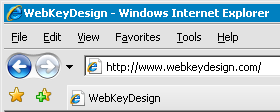
Reference Microsoft Developer Tony Schreiner’s Weblog.
