by WebKeyDesign | May 2, 2006 | Apple
 For some reason Apple’s 15-inch Powerbook is notorious for not liking certain DIMM modules, and I have been meaning to upgrade my main Macintosh, which is of course a 1.5GHz Powerbook. After some trepidation and research on Google, I felt pretty confident in purchasing this 1 Gigabyte DDR DIMM module, which was the cheapest I could find on NewEgg.com. As it turned out the comment reviews on NewEgg were actually correct. The Patriot DIMM worked fine on my Powerbook and I have had no problems with the computer at all since installing it.
I’m not sure if this is true or not, but from I have read, it appears that the less accessible DIMM slot is the most compatible with generic memory. So if you buy a module and not sure if it is compatible try installing it in the bottom most slot. Of course be careful, as the 15-inch Powerbook is also known for having weak memory slots that will break if pushed too hard.
Right now I have the Patriot DIMM in the less accessible slot and a 512MB PNY DIMM in the other slot. The PNY DIMM I got from a retail store and is not part of the original Apple installed memory.
The Powerbook is slightly faster than before now with 1.5GB of memory. But the improvement is not as dramatic as passing 512MB of memory. So if you have 768MB or 1 GB total, don’t expect much improvement, unless you are running lots of applications at once.
by WebKeyDesign | May 2, 2006 | News & Trends
Perhaps you were at your local Best Buy store or even at Target and you saw something like Eazy SuperFast WebSiteBuilder on sale for $29.95 or you were up late watching Comedy Central and heard about how you can make $8000 a month at home with an Internet home business, or you got an offer in the mail to renew you website domain for an easy payment of $49. And I won’t even mention the spam emails from people willing to sell you your domain name for just $69. The problem with all these offers is that they are mostly scams or outright bad deals.
The true objective of these offers is to get you to pay up what seems like a modest fee for something which is either not that valueable to begin with, or not even legitimate. For example, a domain registration does not cost $69 or even $35. At WebKeyDesign, we sell domain registrations at $15, as a service to our friends and clients. Just yesterday I got an offer to renew all of my domains for $35 each, and they included search engine submission and all these extras. Too bad all these extras either cost nothing or they can’t guarantee that you will actually get them! When it comes to domains, paying too much is a bad deal, but paying too low is also something to be avoided. If you are paying almost nothing for a domain registration it means the registrar is selling the domain at almost cost, which equates to very limited support and possibly having your email address used for marketing purposes.
The easy site builder software is actually a good deal, if we were still in the 90’s. Today’s internet users expect quite a lot from a website, and the simple truth is that a cookie cutter style web site that these inexpensive software packages produce, just does not cut it anymore. There is a reason why Dreamweaver costs $300. If these $29 software packages worked well, then Dreamweaver would not exist at all. The simple truth is that you are better off buying a $29 book on HTML and using a free application like Nvu to do your web site, than buying cheap software.
The most outlandish scam of all is the one that promises you the most money. Can you really make thousands of dollars with just a web site? The answer is yes, but it requires a lot of work and investment. You either have the skills to setup and maintain a site all by yourself or you have to pay someone else to help you. Most online ventures that work either have a lot of money behind them or they are very small and do not make huge profits. Consider that there are people who have the technical skills to setup a site, yet they never do it! Why? Because, the maintenance alone requires a lot of time and some people rather use their free time for other things. If however you are interested in starting a home business and using the web to help your business grow, then it is a good idea. Just realize that like anything else you do in business, you have to know what you are doing and spend wisely. Looking for the best return on investment is what business is all about. Spending money without knowing the rate of return, well that’s how you can go out of business.
by WebKeyDesign | May 1, 2006 | Networking
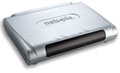 Since upgrading my Qwest ADSL to a higher speed, I have noticed that my old Cisco 678 router was getting pretty outdated by today’s standards. Qwest primarily uses ActionTec modems which are pretty basic and a bit unreliable, depending on whether you believe the complaints on DSLReports.com. They recently upgraded the firmware on the 701 ActionTec modems and are now offering a more user-friendly 2Wire gateway modem, but I already have a couple of wireless routers at home and with Intel pushing a new wireless standard, it is just a matter of time before a wireless router will be outdated. The undeniable solution is to get a reliable standard ADSL modem and hook it up to whatever wireless router you want. In this case the least inexpensive reliable ADSL modem that I can find was Netopia’s 2240N-VGx ADSL2 modem.
Netopia makes a variety of 2200 series products. These are an inexpensive line of ADSL2 compliant routers that are meant for home consumers versus their higher end business series. The 2240N is the least expensive and is available online for about $67. The 2241N adds a USB connection, and the 2246N is a basic 4 port ethernet router. There is also the 2247NWG which includes wireless features.
Purchasing the 2240N or 2241N can be quite hard, since almost every online distributor has them out of stock. Even eBay doesn’t have much in the way of Netopia 2200 series products. I had to wait about about ten days for my 2240N to be delivered. In case you are interested in purchasing either one of these single ethernet port modems, your best bet is Froogle. Do a search for Netopia 2240N or 2241N on Froogle.com. The two major retailers are Buy.com and TechDepot.com.
The 2240N Out Of The Box
Once I opened the rather plain white box what I found inside was pretty sparse. There was the 2240N modem itself, a standard AC brick powersupply, a purple telephone cable, and a yellow ethernet cable. There is a one page sheet of instructions for setting up the “gateway”, and a setup CD that most advanced users will not need.
For setup purposes, I disconnected my Powerbook from the network. Hooked up the 2240N directly to the Powerbook. I had to change Networking to DHCP and let the Powerbook get a new IP address. Following the included instructions, I then simply used Safari to access the web based interface. The Basic Setup option failed to setup my Qwest DSL connection of course.
Two things were needed for the DSL line to work. The first one is easy, once you find the advanced options, you need to change the ATM connection to Qwest’s preferred settings. Look for VPI and VCI settings. VPI needs to equal 0, and VCI should be set to 32. In my case the last thing to do was to call my 3rd party ISP. It seems that my ISP requires that the DSL line be rebuilt or essentially, reset by them in order for new equipment to be recognized. Perhaps a simple MAC Address change would have fixed it on my end, but since my ISP reset it for me in less than two minutes, I was connected and running.
I then hooked up my Linksys Wireless router to the 2240N and hooked my Powerbook back to the Linksys, changed my Network settings in Mac OS X and I was back to normal.
Cisco 678 Versus Netopia 2240N
The 2240N is actually smaller than the Cisco 678. It has bigger LEDs and while the silver case looks cooler than the charcoal 678, the 2240N still manages to look plainer for some reason. Performance wise, the 2240N does train and reset faster than the 678. Download speed does not seem have changed. Browser tests on DSLReports show no improvement, but what does appear to be different is burst speed. While downloading a large image or flash laden web page, the browser seems to get more data at once, so perhaps multiple connections are scaling better. If there is to be a significant speed improvement it will have to be from Qwest, since the 2240N is ADSL2 compliant, it should be ready for Qwest if and when they bring ADSL2 to my area.
Most routers tend to lock up in general when maxing out connections and while I’ve had the 2240N for about a week now, it has only locked up on me once. There is an actual On/Off switch, so I can simply flip the switch and the router is back to normal.
Netopia’s Web Interface
It appears that all Netopia routers have the same operating system, and so they all share the same blue and white web interface. Although Netopia tries to hide the complexity of their advanced screens behind a simple home screen layout, most users will want to access the advanced options. Netopia features two firewalls, a simple ClearSailing firewall that is enabled by default, and a more tighter firewall that locks everything out from the outside. There is both a Services option that makes it easier for average home users to allow RDP and PCAnywhere type connections, and an advanced Pinholes option to select specific ports and ranges. These features would come in handy on the 2246N and 2247N routers, but for hooking up to another router like a Linksys or Netgear, these features are less used. Although you can have a double-NAT network, gamers will probably want to avoid some of the extra security of the Netopia router if they are using a second router.
Netopia features telnet as well, so if you rather telnet into the 2240N, you can.
One thing that you will notice about modern routers, even cosumer based ones is that they now have advanced features that are disabled by default. Netopia will upgrade your router with new features for an extra fee. In some cases, $35 gets you a business class firewall. For the 2240N this is a bit over the top, but for the 2246N or 2247N, the pay-for-features might be more intriguing. Qwest’s new 2Wire modem can be upgraded with a site blocker for a monthly fee, so extra premium features are now becoming the norm.
Final Thoughts
At barely $70 the Netopia 2240N-VGx is an excellent buy. If you have a wireless router or a nice GigaEthernet switch already for your local home network, this single port ADSL2 modem is a great solution. You get more features and solid reliability that beats the equivalent ActionTec modem. However if you want to explore a single router solution, then the 2247NWG compares well with the new Qwest 2Wire gateway router. The 2Wire model is more user friendly, but the Netopia product has a more powerful interface and telnet capabilities.
by WebKeyDesign | Apr 21, 2006 | WebKeyDesign
After battling through constant comment spam day after day, I finally gave in and upgraded WebKeyDesign to latest WordPress 2.0 version. Initially I had forestalled this for months due to the bad experience I had with one of my other sites, but I figured the 2.0.2 version looked stable enough and I was down to just one incompatible plugin.
The installation went quite well. Since I did not change any of the current theme setup, there really was not much to fix after the upgrade, except for entries that had highlighted html code boxes, which relied on the incompatible plugin. Instead of using CodeHighLight, I had to come up with a more complicated solution. I ended up keeping some of the CSS that CodeHightLight uses and then translating the actual code snippets with SimpleCode. This plugin just takes regular code and translates it so the browser will display the code symbols. I then had to take the translated snippets and add DIV tags to them and put them back into each posting. Needless to say, this took some time, but it looks almost as good as what I had before.
As for WordPress 2.0, the performance seems to be better than the older 1.5.2 version, and in the time that upgraded the site and fixed my postings, Askismet caught something like 213 comment spams!
by WebKeyDesign | Apr 18, 2006 | Software
It seems that Windows users specifically have problems with running out of disk space. This is usually the result of too many MP3 files or installed games, or perhaps a program’s log file becoming too large. Whatever the reason and whatever the technical proficiency with Windows, almost everyone could use some help with deleting unneeded files from your Windows hard drive. And this is where CCleaner comes in. CCleaner is a small utility that takes care of safely removing a bunch of old files from your system, without you worrying about it. And it is free (and spam-free), so you can recommend it to everyone regardless of their Windows skills.
Download CCleaner for Windows
