by WebKeyDesign | Jul 9, 2008 | Firefox, Internet Explorer
If you installed Firefox 3 and are using Windows, you might run into a problem where Firefox does not allow you to download exe files from the Internet due to a Windows setting. You will get the message: This download has been blocked by your Security Zone Policy and your download file will never download. To fix this problem you must modify Internet Explorer settings!
- Open Internet Explorer.
- Choose Tools menu – Internet Options.
- Click the Security tab and click on the Internet icon.
- Click the Default Level button if it is clickable
- Then click Custom Level… and navigate to Miscellaneous.
- Under this section find the option: Launching applications and unsafe files.
- Change it from Disable to Prompt (Recommended).
- Click OK, Apply, then OK.
- Startup Firefox again and test it to see if it works now.
IE 8 Browsers
If you are using IE 8, you should probably look at modifying these settings as well:
- Click on Tools – Internet Options.
- Click on the Security tab.
- Click on the Sites button and verify that the website URL is in the list of trusted sites.
- Back on the Security tab, click Custom Level…
- Locate the Automatic prompting for file downloads sub-category immediately under the Downloads category. Set the radial button to Enable.
- Locate the File download sub-category immediately under the Downloads category and set the radial button to Enable.
- Click OK to save the changes and Yes when prompted to confirm the changes.
- Exit completely out of all IE windows and then try it again
by WebKeyDesign | Jul 3, 2008 | News & Trends
 Something which I rarely see being mentioned in the mainstream media is company ethics and consumers. The Internet news sites do cover some of the borderline unethical behaviors of major companies like Apple and Dell, but in reality these stories are aimed more at tarnishing the image of corporations, than really covering the actual situation and shady policies of the workplace. As a consumer of products and services, this bothers me somewhat because I try to only deal with ethical companies. After all would you really buy something from someone you personally knew was a thief? When it comes to corporations, we really should hold them to the same standards as our personal relationships. Although holding corporations accountable seems almost impossible nowadays, there are some things to look for.
Public traded companies do publish their financial records and occasionally their dirty laundry does come to light. Most of the time the bad news is published in obscure trade publications and so it is sometimes hard to find. Eventually if the dirty laundry is serious, it will eventually lead to an investigation or multiple lawsuits. At this point you can pretty much tell that the company acted contrary to ethical standards. Note that this is not something that you find with top corporations only, but with all companies in general. Just because Global Widgets did some illegal stock manipulation, does not mean that their competitor Small Scale Widgets is any less reputable. Sometimes an entire industry is guilty, like when all the memory makers made a group effort to artificially keep memory prices higher.
Perhaps the most direct way of finding out how ethical a company is to talk to them. When you walk into their store, call their customer service line, or email them, what type of response you get can reveal a lot about the type of training that the company gives their employees. Although this probably cannot tell you everything about a company, it does reveal enough to let you know if the company is worthy of your business. Talking may be a lost art, although we communicate every day, we do not do it effectively, and so remember the following points when you engage a company.
- Always ask for what you want directly, do not try to hide your intentions. If you want a cheaper price or think that the service or product is not up to your expectations, ask for an explanation.
- In turn, you should always be fair yourself: do not waste a company rep’s time if you truly are not interested in their services or products.
- Since companies can have multiple businesses, you cannot always hold accountable the bad ethical practices of one of their divisions to all of their other businesses.
- Lastly if you are treated rudely without justification, make the company aware of this, and if the response is lacking, never do business with them again.
In general, companies care about their shareholders more than their customers, it is this mentality that has led many companies to lie, steal, and cheat to make their profits ever larger, only to find out much like Starbucks, that you cannot make money without customers, even if you have thousands of locations.
by WebKeyDesign | Jun 9, 2008 | Out Of The Box
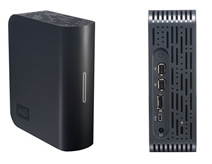 With the plummeting cost of hard drives today, hard drive manufacturers have had to come up with new ways to increase revenues, because selling bare internal hard drives to consumers does not carry much profit these days. The most obvious trend in the industry has been to dress up hard drives with external cases of various color and design and make them more appealing to consumers looking to backup their growing media collections and their occasional backup. All though there are a variety of external hard drive enclosures that you can buy separately, many consumers choose to buy an external case and hard drive packaged. In some cases buyers may be unaware that they can buy ordinary internal hard drives and pair them with a case of their choosing. Then there is cost, quality external cases can cost significantly and cheaper cases may be lacking in quality and looks. Hence the obvious choice is an external hard drive from a major manufacturer, and in this case from the hard drive manufacturer itself. This review covers the Western Digital My Book Home Edition drive. Out of the multiple choices out on the market I actually chose this specific model for the following reasons:
My Book Home Edition Features
With at least three external drives already connected to my Powerbook and a Windows Server in the same room, I wanted to keep noise levels as low as possible. Western Digital’s My Book models are for the most part pretty quiet compared to most third party enclosures. They are designed to stand vertical and save space, without using some sort of snap-on attachment stand.
Most important after design is performance. I needed at least a 500GB hard drive that performed as close as possible to a regular internal hard drive. This pretty much means you need to use something better than USB 2. Performance wise you really need to go with Firewire or eSATA. Both of these technologies outperform USB 2 external drives. The My Book Home Edition is available as a triple interface enclosure, featuring Firewire 400 (preferred on Macintosh computers and servers), eSATA (preferred on newer PC machines), and USB 2 in case you have no other option. If your computer has only USB ports, you can save some money and purchase the My Book Essential Edition instead. Otherwise I believe the extra $40 is worth it for faster performance.
Other features to note include smart energy power down when not in use, a capacity gauge that displays how much space is in use, and some backup software for Windows. Other than the energy smart features I did not setup or use these features. The capacity gauge is dependent on software, so if you do not run the software the capacity gauge feature will not work.
Usage Notes
Western Digital does not include an eSATA cable, so if you plan on using this port, make sure you pick up a cable. Firewire and USB cables are included, as well as a nice AC adapter that takes less space than the usual brick AC adapters you usually get with external devices such as these.
The case is black plastic and it appears to be snapped together, meaning that if the internal drive ever dies, replacing the internal drive may be harder to do than just replacing the entire unit out right.
Since the drive will be used with a Macintosh exclusively I needed to reformat the drive to HFS+, but in case you ever want to use the drive with a PC, I recommend using Apple’s Disk Utility to create an image DMG file of the entire contents of the drive before you format it. You can then always have the DMG file in case you want to restore the original contents of the drive. For Windows, I still recommend formatting the drive. Might as well find out early if the drive has any problems than later.
I have not encountered any problems with the My Book Home Edition and it is my second WD My Book drive. I have an original 230GB Essentials Edition that is connected to my Windows Server. Neither drive has had any physical problems and both are relatively quiet, even when in use.
Western Digital My Book Home Edition Hard Drive
- 500GB
- USB 2 + Firewire 400 + eSATA
- Price: $149
by WebKeyDesign | Mar 22, 2008 | In Stock
 A few months ago I decided to retire my SN41GV2 Shuttle Box PC. The Shuttle Box, which is named Titan, has served me well as a home server, but I had grown tired of the noise level associated with its power supply fans. I worried too that after being upgraded to an Athlon XP 3200, it would one day overheat and take my data with it. Considering price as the most limiting factor, I set out to setup a new Windows Server and found some interesting choices along the way. For example new Intel based Shuttle Box models were intriguing, but the small form factor is limiting and not all that cheap. Intel based servers are fast and reliable, but their price ranges are high for all but entry level Celeron based systems. I have had good experiences with AMD’s Athlons, so I decided to give AMD another chance and looked for Opteron based servers.
The Flavors of AMD Opteron
Seems like AMD is quite popular in the small business server market. You have choices, like the HP ProLiant ML115 Server and at the time I was able to find a lowend Opteron based IBM System X server as well. Almost all of the Opteron servers used an NVidia based chipset and featured similar motherboard specs, so the only decision came down to price and extras. The HP ProLiant had one major difference on the Dell PowerEdge T105, it came with built-in SATA RAID. In end, I waited for Dell to have a sale and the price range ended up being significant. The T105 on sale goes for $349, while everyone else had a $500 or more price tag. At this price it is hard not to buy a Dell. Note that this does not include an operating system or any hardware upgrades like more memory and bigger hard drives. Do not forget to add $20 for shipping, so we are now at around $380.
Server Upgrades
For computer upgrades, you really cannot beat Newegg.com. They have great service and their site has pretty much everything you could ever want when it comes to components. I ended up ordering a 500GB Western Digital SATA hard drive for around $105. The only problem with buying an Opteron based machine is that it uses ECC memory and not regular DDR memory. This ended up costing me twice as much. Instead of the $40 or so for 2x1GB DIMMs, I had to pay around $80 for the same memory and only Kingston has DD2 800 memory ECC DIMMs. The same ECC DIMMs now cost around $50, so they have gotten cheaper in the last six months.
Eventually I will upgrade the DVD Drive and add another internal hard drive. I am still waiting for 2GB ECC DIMMs to become cheaper. The T105 can take up to 8GB of RAM.
Windows2003 Server Performance
At first I had a lot of problems with Windows2003 stability on the new server. Hard drive access especially was slower than expected. The fix ended up being to go into Device Manager and for disk drive, choose Optimize for Performance. This ended fixing the weird pauses I saw in Explorer. Comparing the system to the old Athon XP 3200, which ran at 2.2GHz, the dual core Opteron 1210 18GHz is more stable and application wise feels faster. Some apps do perform better than others, so performance is always relative to the application and if both cores are being utilized. Since this is a server, other than terminal server RDP, I really do not run much in the way of desktop applications. Apache 2 is definitely better on dual cores.
Overall the new server was a good bargain. It is quiet enough for the home office and while the size factor is that of a normal tower, it is very expandable compared to a small form factor PC. I guess it is true, you can’t beat Dell on price.
by WebKeyDesign | Feb 5, 2008 | WordPress
 When dealing with website upgrades, one of the main concerns is trying to make the upgrades go as smooth as possible, but the other concern is that upgrades need to be executed as fast as possible to minimize down time. When it comes to the web, it is a 24 hour cycle, and even 15 minutes of down time can cost web site owners money. Given this, I have come up with the following upgrade process for minor WordPress upgrades, that minimizes down time for web site users, and makes the process a little easier on me.
Verify Backup
Never perform any kind of upgrade without a backup! In the case of WordPress, make sure you have a current database backup and a backup of your wp-config.php file. Now on with the upgrade process…
Prepare Your WordPress Upgrade Files
1. The first thing I do is delete any unnecessary files from the new WordPress release. I do not use the classic theme at all, so I usually delete that theme.
- wp-config-sample.php
- license.txt
- readme.html
- wp-admin\install.php
- wp-content\themes\classic
- wp-content\plugins\hello.php
2. Rename the following folders:
- wp-admin to wp-admin-new
- wp-include to wp-include-new
Uploading Files
3. Upload the two folders that you renamed to your WordPress root directory. Note that this will not overwrite the current folders, since they are named differently. This results in not interrupting the up-time of your site until the next step.
4. Upload all the root files to your site, overwriting the current files already there. Sometimes, it is best to delete the root files first instead of overwriting them, so choose whatever method you prefer. Note that you should keep the wp-config.php file; do not delete this file ever or it will cause problems.
5. Upload the contents of the wp-content folder, meaning you now have to upload the contents of the wp-content/themes and wp-content/plug-ins directories.
Finish Upgrade
6. Most WordPress upgrades want you to confirm the upgrade.php file. This usually runs database changes and such, but for minor builds, it is a good way of confirming the upgrade process worked.
- Run domain_name/wp-admin/upgrade.php
7. Lastly if all went well, you just need to delete upgrade.php and you are done!
Some Notes
Make sure you are familiar with the upgrade process for WordPress and note that some major upgrades may require changes to theme files and such. You may need to modify this upgrade process for a particular WordPress release.


