by WebKeyDesign | Aug 29, 2008 | Site Design
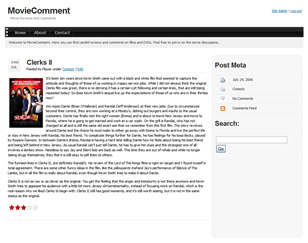 One project that I recently completed was the relaunching of MovieComment. This is a website that I started in 2006 and which I let languish for over a year. The original intent was for me to provide the space for friends to write movie reviews, but for some reason, I could never persuade anyone to write anything down. Eventually I started to neglect the site as WebKeyDesign took most of my time and I also have a regular job that keeps me quite busy these days. Over the last couple of weeks, I took some time out and retrofitted the site with a new WordPress theme, added some content, made some minor improvements, and did a security audit to make sure the site was secure.
For the theme, I went with a theme called dsantuary. The theme had a nice layout and built-in advertisement placement, but I did not like the navigation bar at all. I ended up changing the navigation bar to something I came up myself. Other than this there were a few theme changes, here and there to make the site work. For example the graphic for the sidebar was not tall enough to accommodate a long enough sidebar. I had to create a new graphic for the sidebar. Once I got rid the navigation bar, I had to find a place for the Search form, since the original had it built into the navigation bar. Search was moved into the sidebar.
Plugins
While I will not list all the plugins that are setup on the site, the following plugins were added and configured for specific reasons and are worthy of consideration for most WordPress sites:
Since MovieComment was being relaunched, I needed to make sure that the content was going to be indexed properly and that it will show up correct on search engine sites. To start with good content needs meta tags. WordPress on its own does not really do a good job of providing this. For this you can try a plugin like All in One SEO Pack that tries to setup meta tags correctly for each page of your site. Once your content is meta tagged properly you will need to let search engines know your content is out there. The best way to do this is via a sitemap. The Google XML Sitemaps plugin does a good job of creating a sitemap automatically for you. Once you have Google XML Sitemaps setup go to Google Webmaster Tools to verify that Google has no problems reading your sitemap.
Security is important and I too have made the mistake of letting things slide and have paid the price for not keeping focused on security. Luckily now there are some good plugins to help with this. By installing Login LockDown and, WP Security Scan your WordPress site will be a little bit more secure and being more secure always helps webmasters sleep better.
by WebKeyDesign | Aug 28, 2008 | In Stock
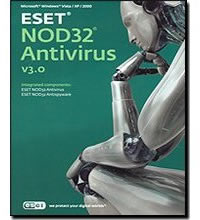 It is pretty much agreed upon that in the Windows world of computing running a computer without anti-virus software is like jumping onto a busy highway and expecting to not get hit. No other platform has as many viruses and now spam infections as Windows. Given that, most Windows users will need to setup some sort of anti-virus application. In this review I will cover why ESET NOD32 should be considered one of your top choices as well as why buying anti-virus software in general can be difficult.
NOD32 Options
All software makers pretty much distinguish between two classes of software these days. You either buy personal software for home use or you spend more and purchase business (sometimes referred to as enterprise) software. It use to be that ESET offered one solution that you could install on Windows2000, WindowsXP workstations and Windows Servers, but they recently changed their software pricing model to make a clear distinction between personal home software and what they call the business edition. It is now no longer possible to buy just 1 license of NOD32 Business Edition so that you can run it on your server. You must instead purchase 5 business licenses and then you will be able to download the Business Edition. The Home Edition no longer installs on any type of Windows Server, it will only install on Windows Workstations! My biggest problem with this is that I run a home server and so I can no longer buy cheap anti-virus software. Almost every vendor now requires a 5 business license limit, so even if I just wanted one or two licenses, I no longer have that privilege.
However if you are not like me, and just have Windows XP or Vista workstations, then you can buy ESET NOD32 Home Edition pretty cheaply. The cheapest way to buy the Home Edition is to just purchase an OEM version. You should be able to find OEM versions for sale on Newegg.com and save yourself a few dollars in the process.
Other than the Home versus Business editions, you can purchase ESET Smart Security which is both an anti-virus and anti-spyware utility. The Smart Security suite is more expensive than NOD32 alone, but it will save you the expense of buying a separate commercial spyware utility.
NOD32 Interface
The software takes a few minutes to install and by all accounts is a relatively easy install. The installer will require the usual Windows restart. From this point on, any time you start Windows, you will get a NOD32 splash screen once Windows gets to the desktop, letting you know NOD32 loaded. The green logo will then appear in your systray and you can click on it to bring up NOD32. Version 3 of the software differs from version 2.7, in that version 3 gives you a nicer looking interface and hides the old style 2.7 setup screens. You can even configure NOD32 to show a simple interface if you think the Advanced Interface is still too cluttered.
NOD32 Protection
NOD32 offers real-time file system protection, email protection, and web access protection. You can turn off email and web access protection if you find those features too intrusive. The web access protection works quite well, it alerted me when I visited a site that had been compromised by a cross-domain JavaScript call. Overall I have been using NOD32 for over a year and in that time it has caught multiple virus problems and best of all, has not slowed my system down in the process.
Other than NOD32, I have tried Computer Associates Anti-Virus products which are very inexpensive compared to other vendors. However it is my opinion that NOD32 is the top anti-virus product in quality for Windows at this time. Business users though might want to look at Sophos who offers enterprise class anti-virus and spam solutions with a good reputation for quality. For home user though, NOD32 is still my best recommendation.
by WebKeyDesign | Jul 9, 2008 | Firefox, Internet Explorer
If you installed Firefox 3 and are using Windows, you might run into a problem where Firefox does not allow you to download exe files from the Internet due to a Windows setting. You will get the message: This download has been blocked by your Security Zone Policy and your download file will never download. To fix this problem you must modify Internet Explorer settings!
- Open Internet Explorer.
- Choose Tools menu – Internet Options.
- Click the Security tab and click on the Internet icon.
- Click the Default Level button if it is clickable
- Then click Custom Level… and navigate to Miscellaneous.
- Under this section find the option: Launching applications and unsafe files.
- Change it from Disable to Prompt (Recommended).
- Click OK, Apply, then OK.
- Startup Firefox again and test it to see if it works now.
IE 8 Browsers
If you are using IE 8, you should probably look at modifying these settings as well:
- Click on Tools – Internet Options.
- Click on the Security tab.
- Click on the Sites button and verify that the website URL is in the list of trusted sites.
- Back on the Security tab, click Custom Level…
- Locate the Automatic prompting for file downloads sub-category immediately under the Downloads category. Set the radial button to Enable.
- Locate the File download sub-category immediately under the Downloads category and set the radial button to Enable.
- Click OK to save the changes and Yes when prompted to confirm the changes.
- Exit completely out of all IE windows and then try it again


