by WebKeyDesign | Mar 26, 2007 | Firefox
Although I like to say that Safari is my favorite browser, my actual default browser for most of the day is Firefox and not Safari. My work day consists of working mostly with Firefox and IE 6. I haven’t gotten around to even working much with IE 7 at all. Luckily Firefox is very adaptable and I’ve managed to piece together a very nice setup of Firefox. It’s not quite perfect, but it is better than IE, and while I do like Safari, one of my pet peeves with it, is that it does not have as many add on features as Firefox. It’s greatest sin though is that the basic setup of Safari does not even have tab browsing enabled!
My favorite add-on to Firefox has to be adding a new theme. While the choices in add-on themes seems almost infinite nowadays, I still think that very few themes actually improve on the default Firefox 2.0 theme. I usually switch between Saferfox and Qute. Of late though I’ve chosen a modified version of Qute, named BlueQute. Somehow, when it comes to computers, other than gray, blue seems to be the most pleasant of neutral colors. If you search for Qute on Mozilla’s Addons site you should find a couple of versions. Qute versions look equally well on Mac OS X, as they do on Windows, so if you work on both systems, it is kind of nice to have one browser look the same across multiple platforms.
by WebKeyDesign | Feb 15, 2007 | Internet Explorer
Just when you think that perhaps Microsoft has learned a thing or two about interface design (after all they just released Vista, which is suppose to be their greatest interface achievement of all time), you install Internet Explorer 7 and are greeted with the cruel joke that is the IE7 Toolbars. Why did they put the menu bar in the middle? This is contrary to every other application on Windows. Supposedly it is due to Vista’s interface.

There is a registry key that you can add to force the menu bar to load on top, like it is in IE6. You will need to add the following key:
HKEY_CURRENT_USER\Software\Microsoft\Internet Explorer\Toolbar\WebBrowser\
ITBar7Position
(Data Type: REG_DWORD) Set to 1 to enable.
After you add the key, close IE7 and open it up and it should now look similar to this:
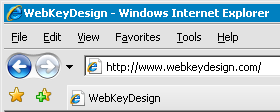
Reference Microsoft Developer Tony Schreiner’s Weblog.
by WebKeyDesign | Feb 14, 2007 | Webmastering
Over the last few weeks I’ve had to work on a Wiki. Overall the experience has been quite challenging, and I have had to adjust somewhat to the limitations of the Wiki script. While I do like the benefit of being able to quickly edit a page or section, I also find myself editing more and more, because I either hate the way my information is presented, or can’t decide on how to organize it. In other words, I find myself being more of an editor than actually authoring content, which over time frustrates me, because the whole reason I am using a wiki in the first place is to create content. The more I use wiki, the more I am beginning to think that I really don’t like wiki as a creative tool. Perhaps it is because I am now too comfortable with regular HTML, or because I use WordPress so much, or maybe because in the end, wiki tools are boring.
I have started to insert more HTML and CSS within the wiki entries to make them look nicer and I am somewhat satisfied with the results now. However I still can’t escape the notion that wiki is as limiting as using Microsoft PowerPoint, which I consider to be one of the worst pieces of software to ever be invented. I hate when people reduce complicated ideas into bullet points. Real life can’t be reduced to just an unordered list of points, it has to have meaning and sadly I think the wiki tool is just one step better than PowerPoint, which is to say it is mediocre. Not bad, but not great.
